Remote Assistance

To provide the best possible service and resolve your issue efficiently, a support technician may need to view your computer screen exactly as you see it. If needed, our support staff will ask you to click the Remote Assistance button to launch the remote viewer and will guide you step by step through the simple process of connecting.
Click here for the Mac version
Skip to main content

Camino

    • Articles coming soon
Print

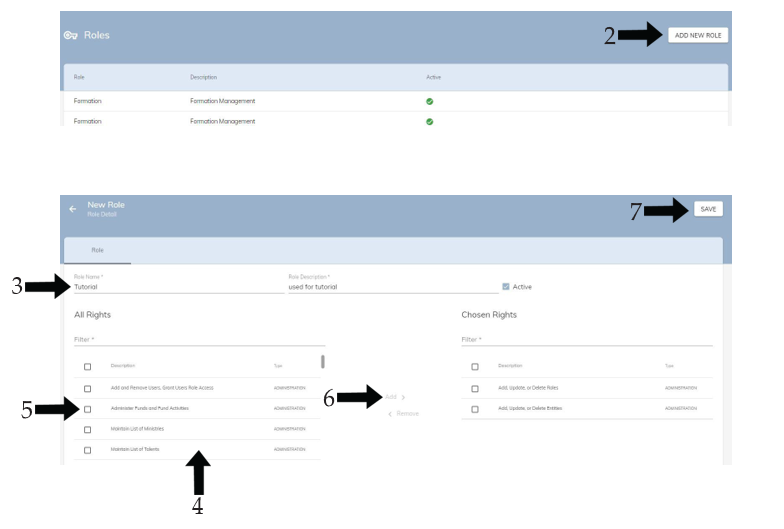
How to create a new role in Camino

  1. On the lefthand side menu, go to Administration > Roles
  2. Click ADD NEW ROLE in the top right corner
  3. Give the new role a name and description
  4. Either scroll or use the Filter search bar to find the desired rights (You can search by type or name of right)
  5. Click the checkbox of the rights you wish to give to the role
  6. Click ADD in the middle
  7. Save the changes made in the top right corner

New Role Tutorial

Can't find what you're looking for?

Send us a message

Contact Us
To top