To provide the best possible service and resolve your issue efficiently,
a support technician may need to view your computer screen exactly as you
see it. If needed, our support staff will ask you to click the Remote
Assistance button to launch the remote viewer and will guide you step by
step through the simple process of connecting.
You can edit your pages and posts easily and quickly. WordPress allows for pages and posts to be edited from both the front-end and the backend of the website. That means that there are two different ways to edit a page/post:
Editing from the Frontend
Editing from the Backend
How to edit your page from the frontend:
Once logged in, navigate to the page you desire to edit.
Click Edit Page or Edit Post on the top admin bar. Note: If you do not see the top admin bar, please refresh the webpage after logging in.
You should now see your page or post editor.
How to edit your page from the backend:
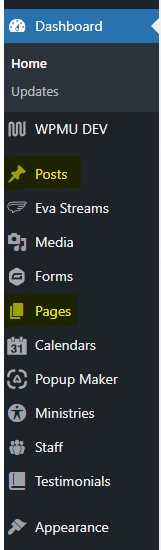
Once logged in, click on either Pages or Posts in the menu on the left-hand side of the Dashboard.
Click directly on the title of the page/post you desire to edit.
You should now see your page or post editor.
Note: You must be logged in and have editing role privileges in order to edit any aspect of the website.