To provide the best possible service and resolve your issue efficiently,
a support technician may need to view your computer screen exactly as you
see it. If needed, our support staff will ask you to click the Remote
Assistance button to launch the remote viewer and will guide you step by
step through the simple process of connecting.
You can add a Category easily. Actively using your posts is important to keeping your website looking updated and alive. Once you begin adding posts, you may run into the issue of organizing them and deciding what should display on the homepage or not. This is when categories come into play. With categories, you can keep updating your website AND decide what posts display on your homepage, or on other pages too.
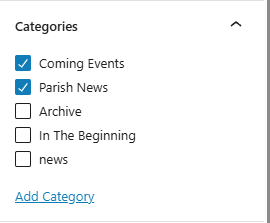
Here is how to add a category while editing a post:
Once logged in, click on Posts in the menu on the left-hand side of the Dashboard.
Click on the post you desire to edit.
On the right-hand side, locate Categories and either click on the box next to the category you want or click +Add New Category.
If adding a new category, enter the title of your new category.
Click Add New Category
The new category will automatically be selected.
Click the blue Update or Publish button to save your changes.