To provide the best possible service and resolve your issue efficiently,
a support technician may need to view your computer screen exactly as you
see it. If needed, our support staff will ask you to click the Remote
Assistance button to launch the remote viewer and will guide you step by
step through the simple process of connecting.
You can restore a deleted page or post in just a few steps. Removing unused pages is a wonderful way to keep your website updated and less confusing for you, the editor. Occasionally, you may trash a page or post that you did not mean to. Thankfully, recovering a page or post that has been trashed is quick!
Here is how to restore a deleted page or post:
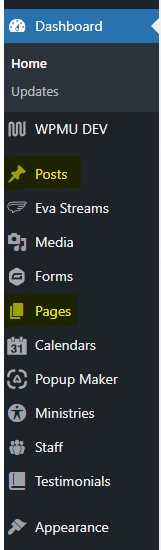
Once logged in, click on Pages or Posts in the menu on the left-hand side of the Dashboard.