To provide the best possible service and resolve your issue efficiently,
a support technician may need to view your computer screen exactly as you
see it. If needed, our support staff will ask you to click the Remote
Assistance button to launch the remote viewer and will guide you step by
step through the simple process of connecting.
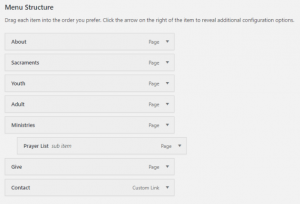
You can reorder your menu quickly and easily. Editing your menu can mean either adding items, rearranging them, or deleting items from your menu.
Here is how to reorder your menu:
Once logged in, hover over Appearance in the menu on the left-hand side of the Dashboard, select the Menus option to bring up the Menu Editor.
Position your mouse over the desired menu item you are wanting to reorder.
Click and hold the left mouse button, then drag the menu item up or down to the desired location. For sub items while holding the left mouse button, drag the sub item to the right under the desired item. Drag to the left to make it a main menu item.
Release your mouse button.
Repeat these steps for each menu or sub-menu item.
Click the blue Save Menu button to save your changes.