To provide the best possible service and resolve your issue efficiently,
a support technician may need to view your computer screen exactly as you
see it. If needed, our support staff will ask you to click the Remote
Assistance button to launch the remote viewer and will guide you step by
step through the simple process of connecting.
You can edit your menu titles quickly and easily. Editing your menu can mean either adding items, rearranging them, or deleting items from your menu. Other times, a page title may not be exactly what you want in the title. In these instances, you can edit the Navigation Label, which will only change the name in the menu.
Here is how to edit your menu titles:
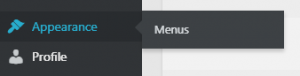
Once logged in, hover over Appearance in the menu on the left-hand side of the Dashboard, select the Menus option to bring up the Menu Editor.
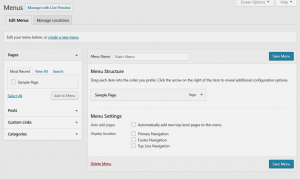
Locate the menu item that you want to change in the Menu Structure box.
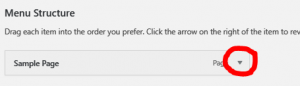
Click on the arrow icon in the top right-hand corner of the menu item/box to expand it.
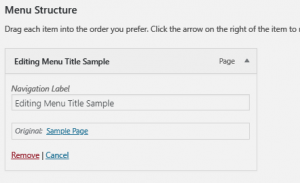
Place your cursor in the Navigation Label field. Change the text as needed. Note: You can always see what the original page title was by looking below the navigation label.
Repeat these steps for each menu or sub-menu item, as necessary.
Click the blue Save Menu button to save your changes.