To provide the best possible service and resolve your issue efficiently,
a support technician may need to view your computer screen exactly as you
see it. If needed, our support staff will ask you to click the Remote
Assistance button to launch the remote viewer and will guide you step by
step through the simple process of connecting.
How to attribute a Loose Contribution to a Household or Community Member
Updated
Go to Contributions > Loose Contributions. A list of all of the contributions that were attributed to the ‘Loose’ Contributions will be displayed
If a parishioner or community member later registers in the parish and needs the contribution attributed to them, search for their name in the Loose Contributions table
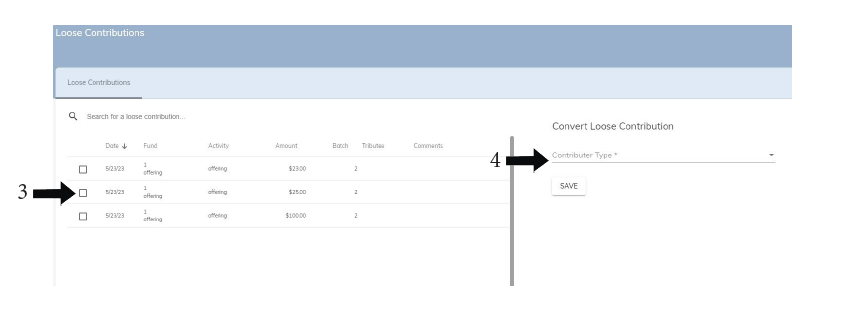
Click the checkbox on the left side of the list, it will turn into a blue check mark
On the right side of the screen, choose the Contributor Type – Household or Community
A field will appear below allowing you to search for the Household or Community Member
Click SAVE
You have attributed a Loose Contribution to a Household or Community Member