Skip to main content
Camino
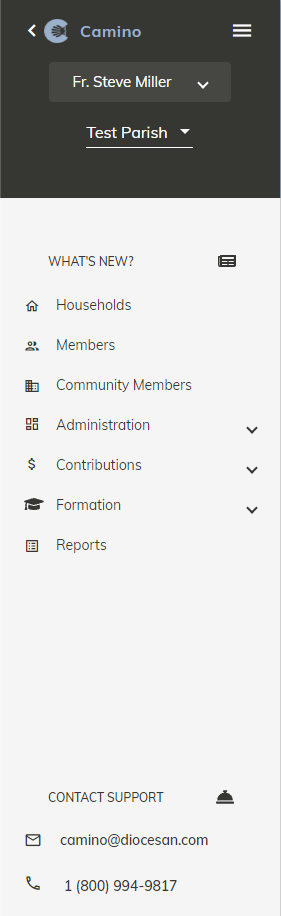
Navigating the main menu
- The dark area contains
- Your Name
- The parish name
- The Camino Logo and name
- Three bars (Known as the “Hamburger Menu or Button”)
- If you click the hamburger button, the Diocesan side menu will appear allowing you to navigate between all Diocesan products
- Arrow (next to Camino logo)
- If you click on the arrow it will hide the main menu
- To bring the main menu back, simply hover over it on the left part of the screen and it will reappear
- To make the main menu remain in view permanently click the arrow again
- In the Applications Section
- What’s new? Click to see Camino’s release notes
- Households – List of all households in Camino
- Members – List of all members in Camino
- Community Members – List of all Community Members in Camino
- Administration
- List of Users
- List of roles that can be assigned to Users
- Parish Information
- Lists such as Ministries and Talents
- Fund list
- Procedures – Batch Sacraments, close out Formation classes, Grade Promotion, and Batch Tags
- Email Settings – Where you enter email info to allow you to email out of Camino. See “Can I email directly out of Camino?” in FAQs for more info
- Contributions
- Import Online Giving
- Batch Contributions and Pledge
- Loose Contributions table
- Formation – For more information see Walk Through Section
- Reports – For more information see Walk Through Section
- At the bottom is the Support Email and Phone Number 8:30am to 5pm EST |